Frequently asked questions and troubleshooting solutions for Needle Engine - from installation issues to licensing, rendering, and deployment.
Licensing
How do I get a license for Needle Engine?
Commercial use of Needle Engine requires a valid license. You can purchase a license on our website: https://www.needle.tools/pricing.
How can I activate my Needle Engine License?
Activating the license in Unity
:::: tabs @tab Needle Engine 4.x
Go to Project Settings/Needle and click on the Login button. Follow the steps and log in to your Needle account.
After that, you'll see your account information in the Unity project settings window. Select the licensed team from the dropdown.
@tab Needle Engine 3.x Open Edit/Project Settings/Needle to get the Needle Engine plugin settings. At the top of the window you'll find fields for entering your license information.
Email - Enter the email you purchased the license with
Invoice ID - Enter one of the invoice ids that you received by email
Note: You might need to restart the local webserver to apply the license.
::::
Activating the license in Blender
Follow the steps in Install the Add-On, then click the Login button in the Add-on settings and follow the steps to log in to your Needle account.
License not found in CI/CD builds
Problem: When running automated builds on CI/CD systems (GitHub Actions, GitLab CI, etc.), you may encounter "license not found" errors even with a valid Needle Engine PRO license.
Solution: Start the Needle License Server before running your build:
This command validates your Needle Engine PRO license and allows automated builds to proceed.
Why is this needed? CI/CD environments are headless and can't use the standard Unity Editor license validation. The license server provides an alternative authentication method specifically designed for automated workflows.
Can I remove the Needle Engine logo and branding (white-labelling)?
Yes, the Needle Engine logo and branding can be removed with a PRO license. This allows you to fully white-label your web experiences with your own branding.
Installation & Setup
My local server does not start / I do not see a website
The most likely reason is an incorrect installation. Check the console and the Needle Engine component for errors or warnings.
If these warnings/errors didn't help, try the following steps in order. Give them some time to complete. Stop once your problem has been resolved. Check the console for warnings and errors.
Install your project by selecting your Needle Engine component and clicking Install
Run a clean installation by selecting your Needle Engine component, holding Alt and clicking Clean Install
Try opening your web project directory in a command line tool and follow these steps:
run npm install and then npm run dev-host
Make sure both the local runtime package (node_modules/@needle-tools/engine) as well as three.js (node_modules/three) did install.
You may run npm install in both of these directories as well.
My local website shows an SSL error e.g. 'Your connection is not private'
You might see a warning in your browser about SSL Security depending on your local configuration.
This is because while the connection is encrypted, by default there's no SSL certificate that the browser can validate. If that happens: click Advanced and Proceed to Site. In Safari, you might need to refresh the page afterwards, because it does not automatically proceed. Now you should see your scene in the browser!
The dialogue should only show up once for the same local server
::: tip Connections are secured, because we're enforcing HTTPS to make sure that WebXR and other modern web APIs work out-of-the-box. Some browsers will still complain that the SSL connection (between your local development server and the local website) can't be automatically trusted, and that you need to manually verify you trust that page. Automatic Page Reload and Websocket connections may also be affected depending on the browser and system settings.
See the Testing docs for information on how to set up a self-signed certificate for a smoother development experience. :::
My local website stays black
If that happens there's usually an exception either in engine code or your code. Open the dev tools (Ctrl + Shift + I or F12 in Chrome) and check the Console for errors. In some cases, especially when you just updated the Needle Engine package version, this can be fixed by stopping and restarting the local dev server. For that, click on the running progress bar in the bottom right corner of the Editor, and click the little ✕ to cancel the running task. Then, simply press Play again.
Installing the web project takes forever / does never finish / EONET: no such file or directory
Make sure to not create a project on a drive formatted as exFAT because exFAT does not support symlinks, which is required for Needle Engine for Unity prior to version 3.x. You can check the formatting of your drives using the following steps:
Open "System Information" (either windows key and type that or enter "msinfo32" in cmd)
Select Components > Storage > Drives
Select all (Ctrl + A) on the right side of the screen and copy that (Ctrl + C) and paste here (Ctrl + V)
NPM install fails and there are errors about hard drive / IO
Make sure your project is on a disk that is known to work with node.js. Main reason for failures is that the disk doesn't support symlinks (symbolic links / softlinks), which is a requirement for proper functioning of node.js. NTFS formatting should always work. Known problematic file system formattings are exFAT and FAT32.
To check the format of your drives, you can:
Open "System Information" (either Windows key and type "System Information" or enter msinfo32 in cmd Windows + R)
Select "Components > Storage > Drives"
There, you can see all drives and their formatting listed. Put your projects on a drive that is NTFS formatted.
On Windows: Make sure you have added toktx to your system environment variables. You may need to restart your computer after adding it to refresh the environment variables. The default install location is C:\Program Files\KTX-Software\bin
I'm getting an error 'failed to load config ... vite.config.js' when running npm commands on Mac OS
You're likely using an x86_64 version of Unity on an (ARM) Apple Silicon processor. Unity 2020.3 is only available for x86_64, later versions also have Apple Silicon versions. Our Unity integration calling npm will thus do so from an x86_64 process, resulting in the x86_64 version of node and vite/esbuild being used. When you afterwards try to run npm commands in the same project from an Apple Silicon app (e.g. VS Code), npm will complain about mismatching architectures with a long error message.
To fix this, use an Apple Silicon version of Unity (2021.1 or later).
You can also temporarily fix it on 2020.3 by deleting the node_modules folder and running npm install again from VS Code. You'll have to delete node_modules again when you switch back to Unity.
How do I upgrade the Needle Engine Unity package?
There are two ways to upgrade:
Via the Needle Engine component: At the bottom of the Needle Engine component in the Inspector, an update button will appear when a new version is available. Simply click it to upgrade.
Via Unity's Package Manager: Open Window/Package Manager, find the Needle Engine package, and update it from there. To access beta, alpha, or other preview versions, you need to enable preview packages in the Package Manager settings first.
Your existing C# code will not export as-is, you have to write matching typescript / javascript for it.
Needle uses typescript / javascript for components and generates C# stubs for them.
Components that already have matching JS will show that in the Inspector.
Does C# component generation work with javascript only too?
While generating C# components does technically run with vanilla javascript too we don't recommend it and fully support it since it is more guesswork or simply impossible for the generator to know which C# type to create for your javascript class. Below you find a minimal example on how to generate a Unity Component from javascript if you really want to tho.
I created a new script in a sub-scene but it does not work
When creating new scripts in npmdefs in sub-scenes (that is a scene that is exported as a reference from a script in your root export scene) you currently have to re-export the root scene again. This is because the code-gen that is responsible for registering new scripts currently only runs for scenes with a Needle Engine component. This will be fixed in the future.
Uncaught ReferenceError: NEEDLE_ENGINE_META is not defined / NEEDLE_USE_RAPIER is not defined
If you are using Vite or next.js make sure to add the Needle Engine plugins to your config. Example for Vite:
Example for next.js
You can also just declare the missing variables in e.g. your root index.html in a script tag like so:
I'm getting errors with "Unexpected token @. Expected identifier, string literal, numeric literal or ..."
Needle Engine uses typescript decorators for serialization. To fix this error make sure to enable experimentalDecorators in your tsconfig.json
Circular reference error
This can happen when you have e.g. a SceneSwitcher (or any other component that loads a scene or asset) and the referenced Asset in Unity contains a GltfObject that has the same name as your original scene with the SceneSwitcher. You can double check this in Unity if you get an error that says something like:
To fix this you can:
Remove the GltfObject in the referenced Prefab or Scene
Rename the GameObject with the component that loads the referenced scenes
If this doesn't fix the problem please ask in our forum.
My scene is not loading and the console contains a warning with 'circular references' or 'failed to update active state'
For Unity: Make sure that you use the UI/Legacy/Text component and not the TextMeshPro - Text component
My UI Text is missing certain characters (e.g. Chinese, Japanese, Korean)
The font atlas generated at export only contains characters from your scene's Text components plus default ASCII/European characters. To include additional characters (e.g. for runtime text), add a FontAdditionalCharacters component to your scene. The font itself must also support those characters.
This usually happens when you're using custom shaders or materials and their properties don't cleanly translate to known property names for glTF export. You can either make sure you're using glTF-compatible materials and shaders, or mark shaders as "custom" to export them directly.
My scene is too bright / lighting looks different than in Unity
Make sure that your lights are set to "Baked" or "Realtime". "Mixed" is currently not supported.
Lights set to mixed (with lightmapping) do affect objects twice in three.js, since there is currently no way to exclude lightmapped objects from lighting
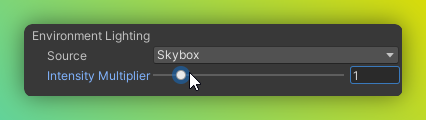
The Intensity Multiplier factor for Skybox in Lighting/Environment is currently not supported and has no effect in Needle Engine
Light shadow intensity can currently not be changed due to a three.js limitation.
My skybox resolution is low? How to change my skybox resolution
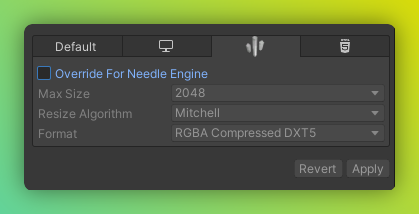
If you use a custom cubemap: You can override the texture import settings of the skybox texture (assigned to your cubemap)
image
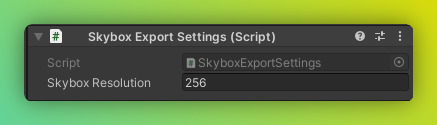
If you use the default skybox: Add a SkyboxExportSettings component anywhere in your scene to override the default resolution
image
My Shadows are not visible or cut off
Please the following points:
Your light has shadows enabled (either Soft Shadow or Hard Shadow)
Your objects are set to "Cast Shadows: On" (see MeshRenderer component)
For directional lights the position of the light is currently important since the shadow camera will be placed where the light is located in the scene.
My colors look wrong
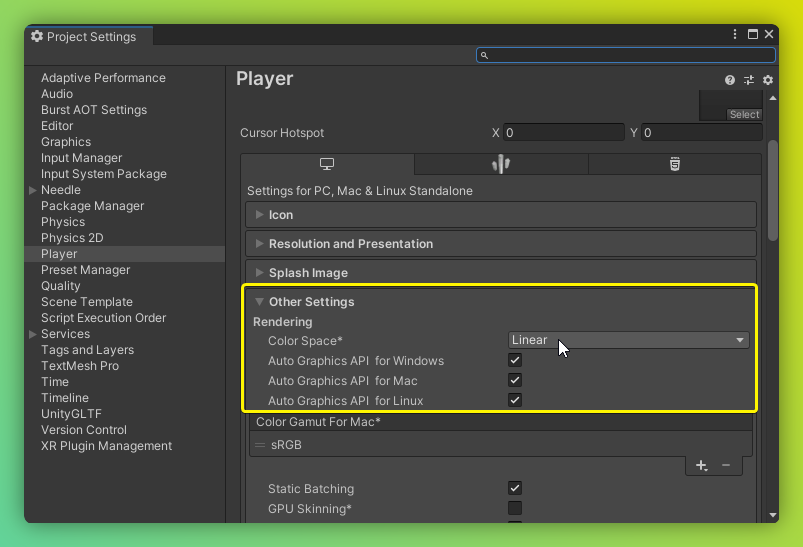
Ensure your project is set to Linear colorspace.
image
THREE.EXRLoader: provided file doesnt appear to be in OpenEXR format
Please make sure that sure that you have set Lightmap Encoding to Normal Quality. Go to Edit/Project Settings/Player for changing the setting.
Performance
My website becomes too large / is loading slow (too many MB)
This can have many reasons, but a few common ones are:
too many textures or textures are too large
meshes have too many vertices
meshes have vertex attributes you don't actually need (e.g. have normals and tangents but you're not using them)
objects are disabled and not ignored – disabled objects get exported as well in case you want to turn them on at runtime! Set their Tag to EditorOnly to completely ignore them for export.
you have multiple GltfObject components in your scene and they all have EmbedSkybox enabled (you need to have the skybox only once per scene you export)
If loading time itself is an issue you can try to split up your content into multiple glb files and load them on-demand (this is what we do on our website). For it to work you can put your content into Prefabs or Scenes and reference them from any of your scripts. Please have a look at Scripting Examples in the documentation.
Deployment & Networking
I'm using networking and Glitch and it doesn't work if more than 30 people visit the Glitch page at the same time
Deploying on Glitch is a fast way to prototype and might even work for some small productions. The little server there doesn't have the power and bandwidth to host many people in a persistent session.
We're working on other networking ideas, but in the meantime you can host the website somewhere else (with node.js support) or simply remix it to distribute load among multiple servers. You can also host the networking backend package itself somewhere else where it can scale e.g. Google Cloud.
Platform Support
Does it work on mobile?
Yes! Needle Engine fully supports mobile devices. Your web experiences work on both iOS and Android phones and tablets – no app required. Users simply open a URL in their mobile browser.
Mobile features include:
Full 3D rendering on mobile browsers (Chrome, Safari, Firefox, etc.)
Touch input support out of the box
Mobile AR on Android (WebXR) and iOS (WebXR via App Clips + USDZ/QuickLook)
Responsive design – adapt your layout to different screen sizes with responsive design tools
Automatic optimization ensures fast loading even on slower mobile connections
Yes! Needle Engine supports VR headsets like Meta Quest and Pico out of the box via WebXR. Users open your experience in the headset's browser – no app store, no installation required.
Supported VR headsets include:
Meta Quest (Quest 2, Quest 3, Quest Pro)
Pico (Pico 4, Pico Neo)
Apple Vision Pro
HTC Vive, Valve Index, and other PC VR headsets
Future devices that support WebXR will work automatically
To enable VR, simply add the WebXR component to your scene. See the VR & AR (WebXR) guide for details.
Does it work on iOS?
Yes! Needle Engine works on iOS in two ways:
3D in the browser – Your web experiences run in Safari, Chrome, and other iOS browsers just like on any other platform. Touch input, responsive layout, and all engine features work out of the box.
AR on iOS – Needle Engine offers two approaches for AR on iOS:
Native WebXR via App Clips – Full WebXR AR powered by ARKit, no app install needed. Users scan a QR code or tap a link to enter AR instantly.
USDZ / QuickLook – Use Everywhere Actions for interactive AR experiences using Apple's built-in QuickLook viewer.
3D in the browser – Works in Chrome, Firefox, Samsung Internet, and other Android browsers with full touch support.
AR on Android – Android has native WebXR support in Chrome. Add the WebXR component to your scene and users can enter AR directly from the browser – no app required.
Use a detector like this one to determine if your device supports WebGL 2, it also hints at what could be the cause of your problem, but generally make sure you have updated your browser and drivers. WebGL 1 is not supported.
Known devices to cause issues:
Lenovo Thinkpad - T495
Editor (Unity)
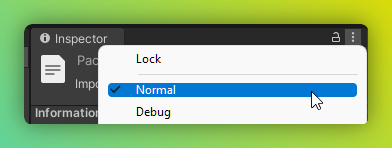
I don't have any buttons like "Generate Project" in my components/inspector
Please check that you're not accidentally in the Inspector's Debug mode – switch back to Normal:
My website doesn't have AR/VR buttons
Make sure to add the WebXR component somewhere inside your root GltfObject.
Optionally add a AR Session Root component on your root GltfObject or within the child hierarchy to specify placement, scale and orientation for WebXR.
Optionally add a XR Rig component to control where users start in VR
AI
How do I use AI to help me build with Needle Engine?